
Troubleshooting
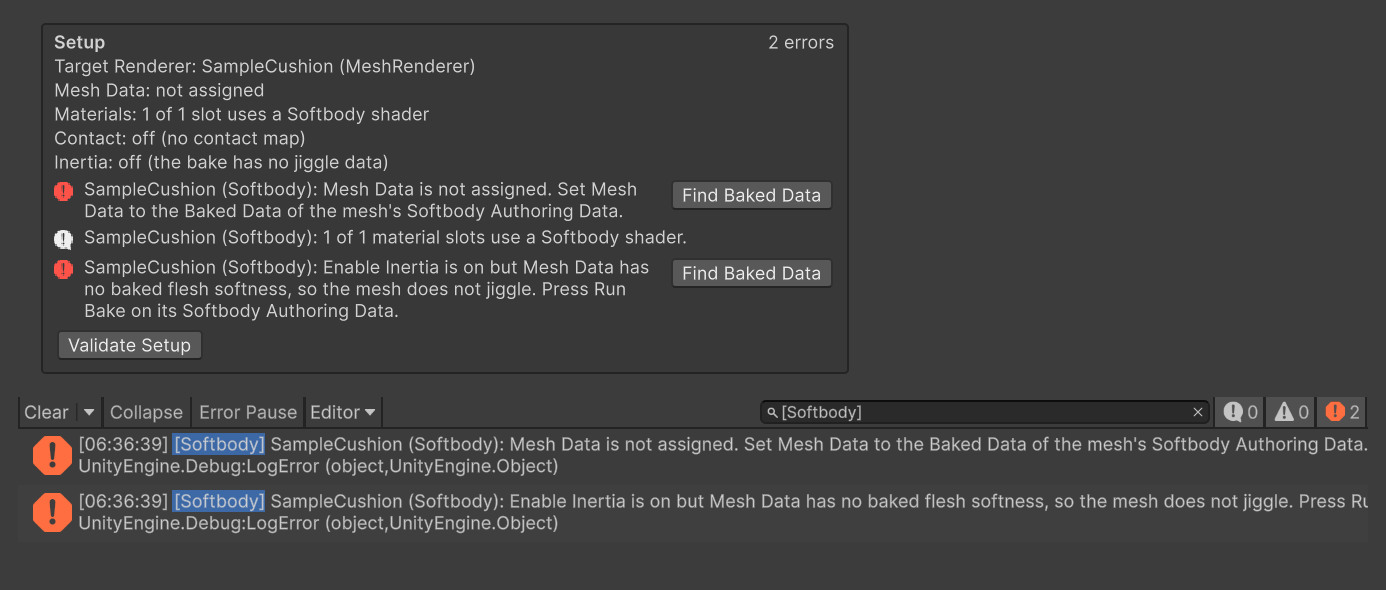
Messages are quoted only in their fixed part. Every message starts with [Softbody] in the Console, and clicking it selects the component or asset that logged it (Logs). Validate on the Softbody Authoring Data and Validate Setup on the Softbody component run the checks each time you press them, and the same checks as Validate Setup also run when Play starts. In the Setup box of the component inspector and the Last Validation list of the asset inspector, the button next to a problem row (Find Baked Data, Use Softbody Materials, Run Bake and so on) fixes it directly. The asset's Last Validation Errors: 0 = no problems, -1 = not checked since the last bake, any other number = the number of error rows (warnings are not counted).
When the first Play freezes for minutes
If the editor is open on D3D11, compiling the contact shaders the first time takes about 15 minutes (on a fast PC), and the editor looks frozen meanwhile. On D3D12 and Vulkan it takes a few seconds. The compiled result stays in the project's Library folder, so later runs do not wait (deleting Library compiles again). Open the editor on D3D12 (Installation).
Play: nothing dents
When contact is first prepared (usually when Play starts), the Console prints one line with the GPU verdict. Contact is available on this GPU (...) means contact runs on this GPU. A warning that starts with Contact is OFF for every Softbody component instead means contact is off on every Softbody component and only jiggle runs.
| Message | Cause | Fix |
|---|---|---|
Contact is OFF for every Softbody component: it needs Shader Model 5 | This graphics API or GPU cannot run compute shaders. | Use a desktop API (D3D12, D3D11, Vulkan). |
Contact is OFF for every Softbody component: the contact compute shader cannot run on this GPU or graphics API | The contact shader could not be created with this graphics API. The parentheses give the API and the name of the first kernel that failed. | Use one of D3D12, D3D11 and Vulkan. Metal has not been verified. |
Contact is OFF for every Softbody component: this GPU or driver | The GPU or driver cannot read the 4-channel float texture bound for writing (checked only on D3D11 and D3D12). | A newer GPU driver may turn it on. |
Contact is OFF for every Softbody component: the package resource | The SoftbodyRuntimeResources asset in the package is missing or does not point to the contact shader. | Reinstall the package. |
Contact is off: no graphics device | The run has no graphics (-nographics, a dedicated server). | Nothing to do. Contact is used only for drawing on screen. |
Contact is off for ...: its contact map was baked with an older plugin | That Mesh Data was baked with an earlier package version. | Press Rebake Contact Map on that Mesh Data's Softbody Authoring Data. |
has no contact map (press Rebake Contact Map on its Softbody Authoring Data) | There is no contact map. Bake Contact Map was off, or the contact map bake failed. | Turn Bake Contact Map on and press Rebake Contact Map (or Run Bake). |
Mesh Data is not assigned. | Mesh Data is empty. | Press Find Baked Data, or assign the Baked Data of the mesh's Softbody Authoring Data. |
found no renderer to deform or no target mesh component | This object and its children have no Skinned Mesh Renderer or Mesh Renderer, and Target Mesh Component is empty. Renderers with Softbody Ignore are not picked. | Add the component to the object that has the mesh (or its parent), press Find, or assign Target Mesh Component. |
is not a Skinned Mesh Renderer or a Mesh Renderer, so it is ignored | Target Mesh Component is another kind of renderer. | Assign a Skinned Mesh Renderer or Mesh Renderer. |
target mesh does not match Mesh Data source | Mesh Data was baked from another mesh. | Press Find Baked Data, or bake this mesh. |
has no material slot with a Softbody shader | No slot uses a Softbody shader. | Press Use Softbody Materials, or press Recreate Material on the Softbody Authoring Data, or put the Softbody properties in your own shader. |
changed after the bake (reimported or edited) or has no per-vertex tables from this version | The vertices changed because the mesh was re-imported or edited after the bake, or the bake was made with an earlier package version. | Press Run Bake. |
is part of a static batch | Static batching changed the vertex order. Both contact and jiggle are off. | Turn off Batching Static on that object. |
has a base vertex offset | A submesh has a base vertex offset. Softbody reads vertices by index. | Export again without the offset. |
another Softbody component (...) already deforms | A mesh has more than one Softbody component. Only the first enabled one runs. | Keep one component per mesh. |
Play: a collider does not press
| Message | Cause | Fix |
|---|---|---|
has no simple collision shape and no shape field | A non-convex Mesh Collider, a Terrain Collider and a Wheel Collider do not press. | Add a Sphere, Capsule or Box Collider, or a Mesh Collider with Convex on. A Character Controller presses as a capsule. If it must press in the mesh's shape, bake a shape field. |
shape field of ... skipped (over 512 parts per frame | More than 512 shape field pieces touched the mesh in one frame. | Reduce the shape fields touching at once. |
| No message; a shape field is baked but the hand presses with the collider's shape (a boxy palm print) | The shape field was filtered out because the renderer's layer is not in Collider Channel or the renderer is under Softbody Ignore, and the collider below presses instead. Or the Softbody Shape Field is on the renderer's object, so the colliders under the bone press too. | Put the hand renderer's layer in Collider Channel. Keep the component on the hand's Animator object (baking from the menu puts it there). Also check that Use Shape Fields is on for the mesh being pressed. |
of a convex Mesh Collider is not readable | The mesh of a convex Mesh Collider cannot be read on the CPU. | Turn on Read/Write in that mesh's import settings. |
contact skipped ... collision shape(s) over the per-frame budget | More than 32 shapes touched the mesh in one frame (convex planes total 2048 across all), or a convex shape has no planes. | Reduce the colliders touching at once. Move colliders that should not press to a layer not in Collider Channel, or add Softbody Ignore (Colliders). |
| No message; the mesh does not dent at all | Go through the checklist from the top. |
When the first touch is a few frames late
A mesh that is touched for the first time must get a set of contact textures from the pool before it starts updating. While meshes of the same kind (contact map resolution, lump or not, coarse grid size) are on, the pool prepares up to Texture Pool (default 2) empty sets ahead of time, but it creates textures only up to Create Budget (default 4 MB) per frame. So when several meshes are touched for the first time at once, or a large character is touched right after it is turned on, dents start a few frames late. Jiggle does not wait. The first update right after a mesh is turned on or spawned also runs for only up to First Updates (default 2) meshes per frame, and the rest run a frame or two later.
If many meshes are touched at once, raise Texture Pool in Project Settings > Softbody. Raising Create Budget, or setting it to 0 (no limit), creates them faster, but that frame may hitch (Project Settings).
When Contact Detail Full runs as Basic
If Contact Detail Full cannot run on this graphics device, so this mesh runs as Basic appears when Play starts or when you press Validate Setup, Contact Detail is set to Full but this GPU has no Full pass, so the mesh runs as Basic. This happens on Metal, and on GPUs that cannot run compute thread groups of 1024 threads (8 along Z). Dents and lumps still run; rise, drag, Edge Smoothing and the Flex paint (bending skin and plates) are off. The settings are kept as they are.
When the bake stops or fails
| Message | Cause | Fix |
|---|---|---|
Target Mesh must be a Skinned Mesh Renderer or a Mesh Renderer inside a model or prefab asset (inspector) or Target Mesh is not set | Target Mesh is empty, a scene object, or another kind. | Assign a renderer inside a model (FBX) or prefab asset. |
is on a Skinned Mesh Renderer without bones (blend shapes only) | A Skinned Mesh Renderer with blend shapes only and no bones. | Use a Mesh Renderer, or skin the mesh to at least one bone. |
Core Placement is Custom Spheres but Rigid Core Spheres has no sphere | Custom Spheres needs at least one sphere. | Add a sphere, or change Core Placement to Center or Bottom (Baking). |
Could not place the rigid core | Center and Bottom read the inside of the mesh, and this mesh has no closed inside. | Use a closed mesh, or use Custom Spheres. |
Could not measure the flesh: the mesh encloses no volume or Could not build the outer surface: it came out empty | The mesh is not closed (a one-sided sheet, an open tube). Giving a separate inner mesh is not supported yet. | Close the mesh in your DCC tool. |
Bake stopped: the contact map normals point inward | The faces point inward. | Close the mesh, make the faces point outward and press Rebake Contact Map. |
Contact Map Seams is set to Automatic (XAtlas), which is not available yet | Automatic seams cannot be made yet. | Set Contact Map Seams to Mesh UV0 Islands. |
Could not use the mesh's UV0 islands for the contact map | UV0 cannot be used (zero area or folded UVs; the message gives the reason). The bake stops. | Fix UV0 in your DCC tool. |
has no UV0. The contact map and slot mask paint need UV0. | The mesh has no UV0. | Create UV0 and re-import. |
Could not fit ... contact map islands into one contact map | There are too many islands for the resolution. | Raise Contact Map Resolution. |
No rigid core | No bone with skin weights lies inside the mesh. The bake continues without jiggle. | Check that the skeleton's bones lie inside the mesh. |
Inertia bake failed: the rigid core holds too few grid points | The core is too thin for the measurement grid. | Raise Bone Thickness, add Rigid Core Spheres (Custom Spheres), or lower Measure Cell Size. |
Inertia bake failed: no surface vertex can jiggle | Rigid core or flesh painted as bone covers the whole mesh. | Lower Bone Thickness, or brighten the Depth paint on soft flesh. |
vertex positions that are not finite numbers | Vertex positions contain NaN or infinity. | Fix the mesh in your DCC tool and re-import. |
not triangles. Softbody bakes triangle meshes only. | A submesh is made of lines or points. | Export a triangle mesh. |
skin weights that point outside the renderer's | Skin weights point to bones the renderer does not have. | Fix the mesh's skinning and re-import. |
remaps its material or has a material slot with no material | The model remaps to a deleted material, so the slot is empty. Slots whose name is unknown are not found by Softbody Material Slots and Slot Masks and are not deformed. | Set the material again in the model import settings under Materials (Remapped Materials) and press Run Bake. |
Contact map bake: the mesh has ... vertices but the baked data has | The mesh changed after the last bake. | Press Run Bake. |
Output Folder already has ..., baked from a different mesh | The Output Folder holds the bake of another mesh with the same name, and overwriting it would break that mesh. | Pick a different Output Folder. |
is not a folder the bake can write to or Output Folder must be inside the Assets folder | The Output Folder is outside the Assets folder. | Use a folder inside the Assets folder. |
is package content and cannot be changed | The model or the Baked Data is inside a package. | Import the sample from the Package Manager, or copy the model into the Assets folder and bake the copy. |
was canceled because Play mode started | Play started during the bake. Nothing changed. | Stop Play and press the same button again. |
Another Softbody bake is running. | Only one bake runs at a time. | Press it after the earlier bake ends. |
already had unsaved changes before the bake, so the bake did not save them or Some assets could not be saved | The bake does not save assets that already had unsaved changes. | Save them yourself (File > Save Project). |
When Validate reports problems
| Message | Cause | Fix |
|---|---|---|
Nothing to validate - Baked Data is empty | Not baked yet. | Press Run Bake. |
Baked Data was baked from a different mesh than Target Mesh | Target Mesh changed after the bake. | Press Run Bake. |
The mesh changed after the bake (reimported or edited) | The vertices changed because the mesh was re-imported or edited after the bake. | Press Run Bake. |
The flesh softness bake is missing or out of date, so nothing jiggles | The jiggle data is missing. A skeletal mesh needs a bone with skin weights inside the mesh; a static mesh needs the rigid core set by Core Placement. | Provide that, then press Run Bake. |
There is no contact map, so nothing dents | Bake Contact Map is on but there is no contact map. | Press Rebake Contact Map (or Run Bake). |
No slot uses a Softbody material, so the mesh will not deform | The mesh has no Softbody material yet. | Press Recreate Material, or assign the material and press Rebake Contact Map. |
Volume Preservation is ... but the flesh was measured with | Volume Preservation changed after the bake. Dents already use the new value. | Press Run Bake so the whole lump spreads with the same material. |
the slot paint changed since the flesh was measured | The paint changed after the last Run Bake, so jiggle and contact read different paint. | Press Run Bake. |
vertices on the tessellated Softbody slots have split normals | A slot with a tessellated material has edges with split normals (hard edges), and a small gap can open at such an edge when it dents. | Smooth the normals of that slot in your DCC tool, or use Softbody/Lit for that slot. |
units long. Softbody expects 1 unit = 1 m | The mesh is very small or very large. The units may have been imported wrong. | Check Scale Factor and Convert Units in the model import settings. |
is in a LOD Group. Softbody bakes and deforms LOD0 only | LODs other than LOD0 neither dent nor jiggle. | Make LOD0 visible at close viewing distances. |
is marked Batching Static | Static batching changes the vertex indices, so Softbody reads the wrong values. | Turn off Batching Static on that object. |
GPU Resident Drawer is on, and it may draw | The GPU Resident Drawer may draw with changed vertex indices. | Add the Disallow GPU Driven Rendering component to that Mesh Renderer. |
is imported with at most 4 bone weights per vertex (Skin Weights: Standard) | The model is imported with at most 4 bone weights per vertex, so Softbody and the skinning see fewer weights than the model has. | In the model import settings under Rig, set Skin Weights to Custom and Max Bones/Vertex to 32, and press Run Bake. |
VerifyIntegrity <Baked Data>: ... or VerifySkeletal: ... | The baked textures or tables no longer match the mesh (the mesh was edited or re-imported after the bake). | Press Run Bake. |
Paint and inertia groups
| Message | Cause | Fix |
|---|---|---|
Could not read the slot paint, so Depth and Volume are baked as 1 everywhere | The paint could not be read when the contact map was baked. | Press Run Bake. |
its Paint Texture has no source pixels or Paint: could not read the pixels of mask texture | The source pixels of the Paint Texture cannot be read, so that slot stays unpainted (white). | Re-import the texture, or set that channel to White everywhere (unpainted) or Black everywhere. |
has sRGB on, so the bake reads it as a color | sRGB is on for the Paint Texture, so gray reads darker (0.5 becomes 0.21). | Press Turn Off sRGB in the inspector, or turn off sRGB (Color Texture) in the texture settings. |
which is black everywhere, so the whole slot becomes | A channel is black over the whole texture, so the whole slot becomes one of bone, rigid flesh, foam or plate. | If you do not use that channel, set it to White everywhere (unpainted). |
Paint: the flesh on the Softbody material slots barely moves | Flesh that should jiggle barely moves. | Check that Depth and Jiggle on soft flesh are not black. |
Paint: the deepest flesh moves ...x as far as the reference flesh | Deep flesh moves much more than the reference flesh, and Inertia Amount shakes it that much more. | For a human-sized body, set Flesh Reach to about 3 and press Run Bake. |
Paint: the jiggle amount (after Physics Driven Bones) changes sharply over a narrow strip | Because of Physics Driven Bones, the jiggle changes sharply within a narrow strip. That area can look torn or folded when it jiggles. The message gives the mesh position. | Make the skin weights of those bones fall off wide and gently. |
in Physics Driven Bones is not in the skeleton | A bone name in Physics Driven Bones has a typo. | Fix the name. |
Paint: Physics Driven Bones were skipped because the mesh has no skin weights | The mesh has no skin weights. | Check the mesh's skinning and press Reapply Paint. |
The mesh has no material slot named | Slot Masks, Softbody Material Slots or Pressable Slots has a slot name the mesh does not have. The end of the message says which list. | Fix the name. |
Inertia groups: all ... groups are taken, so lump bone ... gets no group of its own | More bones jiggle than Max Inertia Groups allows. | Raise Max Inertia Groups (up to 16). |
Lumps: could not read the baked inertia groups or Paint: the inertia groups could not be read | The inertia groups could not be read when the contact map or the paint was rebuilt on its own. | Press Run Bake. |
The Flex paint dents like bare skin because Contact Detail is Basic or Flex Offset has no effect because Contact Detail is Basic (Play, Validate Setup) | Flex works only in Contact Detail Full. | Set Contact Detail to Full for a mesh that needs plates or bending skin. |
Flex plates: ... painted pieces wrap around the body | A piece that wraps around the body cannot become a plate and bends by its paint. | Leave thin white gaps in the paint to split it into flat pieces. |
Flex plates: ... painted pieces have no contact map cells under them | The piece is outside the slots that dent, or a floating piece has no dentable surface under it. | Add the slot below to Pressable Slots, or put the decoration close to the skin. |
Flex plates: ... painted pieces cover more than | The piece is too large to become a plate and bends by its paint. | Paint it as smaller pieces with thin white gaps. |
Flex plates: ... painted pieces sit at the very edge of the contact map | The piece sits on the edge of the contact map and cannot be read as a plate. | Rebake with a different Contact Map Resolution. |
Flex plates: ... coarse cells ... are shared by two rigid pieces | Two plates share one coarse cell, so pressing there moves only one of them. | Paint the plates with a gap wider than that coarse cell. |
Not denting? Checklist
On the Softbody component and the mesh's Softbody Authoring Data:
- It is Play. Contact runs only in Play mode.
- Enable Contact is on.
- Mesh Data is this mesh's Baked Data. When you press Validate Setup, the Console should show
setup validandcontact=on. Withcontact=off (...), the parentheses give the reason. - The mesh was baked with Bake Contact Map on, and passes Validate.
- The pressing object is on a layer in Collider Channel (default: every layer except Ignore Raycast), is enabled, is not a trigger, and is one of Sphere, Capsule, Box Collider, Convex Mesh Collider and Character Controller. It and its parents have no Softbody Ignore, and it is not under Ignore Root (if empty, the nearest parent Animator, or else this object).
- Find Colliders Automatically is on.
- Min Screen Size (default 0.15): while the mesh looks smaller than this value in any camera, including the Scene view, denting stops. Set it to 0 to rule this out.
- The dented slot uses a Softbody shader material. After changing a material, press Rebake Contact Map once more to link the material to the contact map.
- Between two Softbody meshes, only one presses (Colliders).
Dents look wrong
- Lines or steps across the surface. A dent that crosses a split of the contact map is slightly less exact. Contact Map Seams splits at the mesh's UV0 seams. Turn on Debug View and set Debug View Mode to 2 to see the splits as lines where the checker breaks.
- A fingertip blurs instead of making a dent. Raise Contact Map Resolution (512 for a human-sized character, 1024 if seen up close). The dent shape moves only at vertices, so a narrow dent between vertices shows only as shading. Make meshes seen up close dense. Debug View Mode 5 shows in green where a dent is read inside a triangle, and in red where only the vertices along a seam move.
- The dent is too shallow, or a collider sinks in without denting. Up to Max Contact Depth (default 15 cm), the pressed depth is drawn as it is; beyond that it shrinks smoothly and stops at 1.3 times. If the collision lies a few cm inside the visible skin (a body capsule), set Max Contact Depth to that gap.
- The dent is too wide or too narrow. The width is set by the flesh thickness and the Softbody component's Skin Tension (Flesh material). Move the rigid core (Core Placement, Rigid Core Spheres, Bone Thickness), or change Max Flesh Thickness or the Depth paint. Check the core position in the Rigid Core view of the Softbody Authoring Data preview.
- Pressing the top dents the sides too. When the rigid core is only at the bottom, the sides are measured as very thick flesh. Set Max Flesh Thickness a little more than the deepest press and less than 1/4 of the object's width.
- Flex paint bends stiffly or does not move as a plate. Flex works only when Contact Detail is Full. If it is Full and the plate still does not form, the
Flex plates:lines in the bake log give the reason for each piece (the table above). - A dent follows the wrong bone. If
the bones of ... differ from the bones Mesh Data was baked withappeared, the skeleton changed after the bake. Press Run Bake.
Jiggle looks wrong
- Nothing jiggles. Check Enable Inertia and Contact Only (Debug). If the bake has no jiggle data, Validate Setup reports
Enable Inertia is on but Mesh Data has no baked flesh softness. - Part of it does not jiggle.
inertia group bones were not found on the mesh's skeletonmeans the skeleton changed after the bake, or the bone objects do not exist because of the model's Optimize Game Objects. Press Run Bake again, or put those bones in Extra Transforms to Expose. - The flesh jiggles but the shading does not follow. If
was baked before jiggle shading existedappeared, press Reapply Paint. - The same Inertia Amount shakes differently on different meshes. If
uses the old jiggle scaleappeared, press Reapply Paint. - Gravity Scale or Lump Yield has no effect.
Gravity Scale has no effect because this mesh has no lumpsorLump Yield and Lump Grip have no effect becauseappears. For a skeletal mesh, set the breast or buttock bones to Lump in the Softbody Authoring Data's Bone Overrides and press Run Bake. A static mesh has no lumps. - Flesh jumps when frames drop. A frame longer than Hitch Guard (default 0.1 s) counts as a hitch, and its acceleration is ignored. If it still jumps, lower the value.
- Flesh jumps on a respawn or a camera cut. A move farther than the distance the current speed could cover plus Teleport Distance (default 50 cm), or a turn more than 45° beyond what the last rotation speed could cover, counts as a teleport and does not jiggle. Lower the values, or call
NotifyTeleported()from a script on the frame you move it. If jiggle disappears in real fast movement, raise the values. - A large lump flattens at its largest swing. Max Inertia Offset (default 25 cm) clips the motion drawn on screen. Raise it for large characters. To change the feel of large motions, use Inertia Firmness.
When the material is white after Quick Start
Create Softbody Material copies the base color and normal map from the slot's original material. The sample cushion has neither, so Copied: base color (not found), normal map (not found) appears. Set Base Map and Normal Map yourself on the material variant.
Questions
Can I give the component a list of colliders directly? No. There is no such list and no script function. With Find Colliders Automatically off, outside colliders do not press the mesh. Collider Channel, Ignore Root and Softbody Ignore decide what presses (Colliders).
Can I see dents in the Scene view without pressing Play? No. The component works only in Play mode. While playing, Min Screen Size counts the Scene view as a camera.
How do I remove Softbody from a mesh? Delete the Softbody component, and put the original material back in the slots through the model import settings under Materials (Remapped Materials) or in the prefab. The bake does not change the mesh. The baked assets (Softbody Authoring Data, Baked Data, materials) can be kept or deleted.
What do I rebake after updating the package? If Validate or Validate Setup says something was baked with an earlier version, press the button the message names (Run Bake, Rebake Contact Map, Reapply Paint). With no notice, no rebake is needed.